


Visible mobile
4.613.91K Reviews
App Specs
- Version
- 2.2.28
- Updated On
- License
- Free
- Downloads
- 1,000,000+
- Developer
- Visible Services, LLC
- Categories
- Communication
- Platform
- Android, iOS
Screenshots
 Analysis by AppCompare
Before you switch phone service, it helps to separate two things that are easy to blur together: Visible mobile is the account-management app, while the quality of your everyday calls and data depends on the mobile service behind it. I find that distinction useful for setting expectations. The app can make routine account tasks easier, but it cannot make a weak-coverage location suddenly reliable.
For someone moving from a traditional carrier’s store visits, paper bills, or phone support, the appeal is a more self-directed setup. You handle the relationship with your service through your phone. That can be liberating when you like to manage things on your own, though it may feel less reassuring if you expect a nearby shop or a person on the phone to walk you through every decision.
Who is likely to appreciate the app
I’d consider it if you already prefer doing practical tasks on your phone and want to keep service management in one place. A person who checks a bill, makes a payment, or reviews account details between errands is likely to value that approach more than someone who rarely opens carrier apps and wants every question handled face to face.
It may also suit a household or group that is comfortable coordinating a shared savings arrangement. The practical question is not simply whether friends can join; it is whether everyone is happy to rely on the same plan structure and communicate if circumstances change. If people in the group have very different needs or want separate, highly customized arrangements, keeping accounts independent may be less complicated.
When another kind of service may fit better
If your work depends on steady service in a particular building, route, or rural area, I would check coverage for those places before switching. A carrier app’s tidy screens are not a substitute for usable reception where you live and travel. Ask people who use the service nearby, and pay special attention to the spots where you need calls or data most, rather than relying only on a broad coverage impression.
I’d also pause if you want the flexibility of comparing many plan add-ons or speaking with a representative before making each change. Visible’s phone-based approach is best for people who are comfortable handling routine decisions digitally. Someone who values in-person help or a more traditional customer-service relationship may be happier with a carrier that emphasizes those options.
Getting Started with Visible Mobile
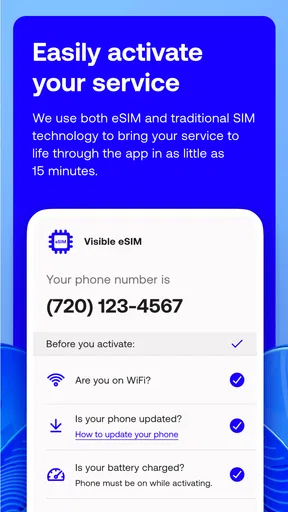
So, first things first. Downloading Visible mobile was a breeze. It’s available on both Android and iOS, so no worries about compatibility issues. Once I had it on my phone, the setup was surprisingly simple. I didn’t have to jump through hoops or decipher any cryptic instructions.
Worth Reading Before You Choose

EA SPORTS FC Mobile 26 Is a Bigger Football Game, but It Takes Time

Flipboard Shows What News Apps Must Do Beyond the Feed

Switching to Android Auto Means Rethinking Your Driving Routine

Google Calendar Makes a Crowded Week Easier to Manage

Ludo King Makes the Most of the Minutes Between Plans

Baby Panda World Brings Quick Play to Modern Phones, but Its Game Library Feels Busy
Visible Services, LLC develops this free communication app. It is rated for Everyone, has a 4.6 average from around 69,000 ratings, and has passed the one-million-install mark. Those figures suggest that plenty of people have tried it, but I’d still make the decision based on whether its phone-service model suits your routine rather than popularity alone. The app’s current version is 2.2.25, and it requires Android 7.0 or later.
The app has a clean and intuitive interface. I was greeted with a dashboard that felt like home almost instantly. Everything is neatly organized, making it easy to navigate even if you’re not a tech wizard. As someone who likes things straightforward, I appreciated this aspect a lot.
Making the first setup count
For a first-time user, I’d start by deciding whether you are simply exploring the account interface or ready to move your phone service. Those are different commitments. Before relying on any new service, check that your phone and the places where you use it most are a sensible fit. Doing that early is less stressful than discovering a coverage concern after you have built a daily routine around the switch.
Keep the first session focused: find the account area, learn where billing and usage information live, and make sure you understand how you would get help if something goes wrong. You do not need to memorize every screen. Knowing where to return for the two tasks you use most—checking account details and handling a payment—will make the app feel useful much sooner than browsing every menu at once.
A realistic first success might be checking your account after setup and knowing exactly where the next bill-related task belongs. That small test matters because it tells you whether the app’s self-service style works for you. If you are helping a family member, let them try those steps themselves while you are nearby; a smooth handoff is a better test of clarity than simply watching someone else tap through the screens.
Exploring the Features
Now let’s dive into what makes this app tick. The killer feature here is the unlimited data. Yep, you heard that right. Visible mobile offers unlimited data, messages, and minutes without any sneaky fees. I could stream, browse, and chat to my heart’s content without worrying about overages.
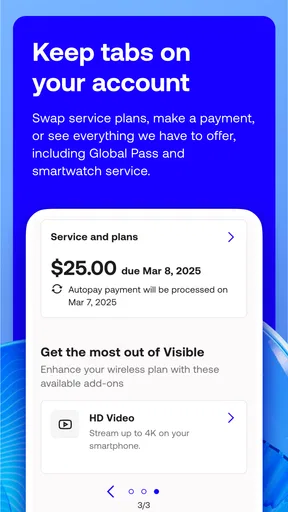
Another cool feature is the ability to manage your account and payments directly from the app. Forget about waiting on hold with customer service; everything from checking your usage to paying your bill is just a tap away. I found the payment process smooth and secure, which is a big plus.
A useful habit is to open the account view before you need to make a time-sensitive payment, rather than waiting until the last moment. That gives you a chance to become familiar with the layout while there is no pressure. I’d also keep an eye on whatever account and billing details the app presents after a change, so you can spot a mismatch early instead of assuming a tap completed exactly as intended.
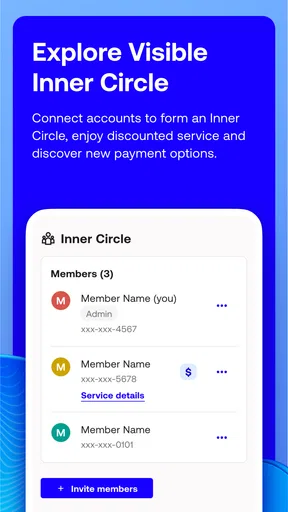
And here’s something that caught my eye: the party pay option. You can team up with friends or family to lower your monthly bill. The more people you add, the more you save. It’s like a group discount but for your phone bill. I tried this with a couple of friends, and it worked seamlessly.
The group option is most compelling when the people involved already communicate easily. Before joining, agree on who will invite whom and what everyone should do if someone leaves or changes their service needs. This is less about technical difficulty than avoiding a small social tangle: a shared saving is only convenient when the group understands the arrangement and nobody is surprised by how it works.
How it fits into an ordinary week
Imagine you are heading out for the day and realize you have not checked your account since setting up service. Instead of searching old messages or calling a support line, you open the app, look at the relevant account information, and deal with a payment when it suits you. Later, if a friend asks about joining a group arrangement, you can explain what you have learned from your own account rather than guessing. That is the practical appeal: ordinary service chores become phone tasks you can handle at a convenient moment.
For a frequent traveler, the same convenience has a limit. A quick account check is easy, but it should not be confused with a guarantee that coverage will be equally strong on every leg of a trip. I would treat the app as a place to manage the account and evaluate network suitability separately, especially before depending on mobile data for navigation, work, or staying in touch in unfamiliar areas.
Performance and Reliability
Let’s talk about performance. I was curious to see how Visible mobile held up in terms of speed and connectivity. Using Verizon’s robust network, the app delivered impressive coverage and speed. Whether I was downtown or chilling at home, I experienced solid and reliable service.
Streaming videos and making calls were smooth, with no noticeable lags or interruptions. I tested it in different locations, and the consistency was commendable. This app really shines in providing a dependable mobile experience.
My experience should not be treated as a promise for every address or device. Network results can vary with location and conditions, so I would test the places that matter to you rather than assuming my routine will match yours. If a call drops in a particular room or a data-heavy task feels slow, try the same task somewhere you know has better reception before deciding whether the issue is the app, the phone, or the local network.
Compared with a conventional carrier app, the main distinction is not that one category of app magically improves reception. It is the service arrangement and how you prefer to manage it. A traditional provider may be a better fit if local store support, a particular plan structure, or a well-established account relationship matters more to you. Visible’s appeal is strongest when digital account management and its plan approach line up with your needs.
Customer Support and Community
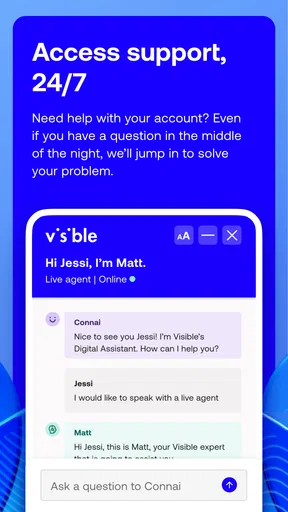
No app is perfect, and sometimes you might need a little help. That’s where Visible mobile’s customer support steps in. The app offers a chat feature where you can get assistance directly. I tried it out with a couple of queries and received prompt, friendly responses. It’s nice knowing help is just a message away.
For a smoother support conversation, I’d describe the issue in a specific way: what you were trying to do, what happened, and whether the problem concerns your account or the connection itself. That distinction helps keep a billing question from getting mixed up with a coverage complaint. If the issue affects a time-sensitive task, make a note of the key details before opening chat so you can explain it clearly.
Visible mobile also has a vibrant online community. You can join discussions, ask questions, and share tips with other users. It’s like having a support group for your phone service, and I found it incredibly helpful.
I see community discussions as a useful second perspective, not a replacement for account-specific help. Other users can share how they approached a common situation, but their device, location, or account circumstances may differ from yours. Use their experiences to form a better question, then rely on the appropriate support channel for anything that needs attention on your own account.
Final Thoughts
Wrapping up my experience with Visible mobile, I have to say it’s a game-changer for anyone looking to simplify their mobile service. The combination of unlimited data, easy account management, and reliable performance makes it a standout choice in a sea of mobile apps.
Whether you’re tech-savvy or just want something straightforward, this app delivers on its promises. So, if you’re tired of complicated phone plans and hidden charges, give Visible mobile a shot. It might just be the hassle-free solution you’ve been looking for.
My recommendation is to approach it in a practical order: decide whether the service arrangement suits you, check the places where you depend on your phone, then use the app to learn the account and payment flow before you need it urgently. That turns a vague promise of convenience into a real test. If those steps feel comfortable, the app can make routine phone-service management feel lighter; if you need hands-on help or coverage that you have not verified for your own routine, another option may be the wiser choice.
Pros
- Simple
- user-friendly interface.
- Unlimited data with no speed throttling.
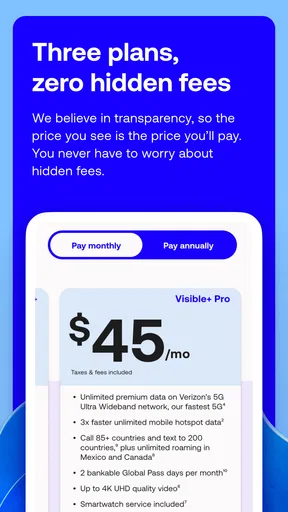
- Affordable pricing with no hidden fees.
- Reliable network coverage across the U.S.
- No annual contracts or activation fees.
Cons
- Limited phone compatibility options.
- No international calling features.
- Customer support only via chat.
- No physical stores for in-person help.
- Data deprioritization during congestion.
FAQs for Visible mobile
What is Visible Mobile and how does it work?
Visible Mobile is a digital-only wireless carrier that operates on the Verizon network. It offers an unlimited data plan at a flat rate, with no annual contracts or hidden fees. Users manage their accounts through a mobile app, making it a convenient option for those seeking a straightforward and affordable mobile service.
Are there any limitations to the unlimited data plan?
While Visible Mobile offers unlimited data, speeds may slow during network congestion. Video streaming is typically capped at 480p, and mobile hotspot usage is limited to 5 Mbps. These limitations are important to consider for users who rely heavily on streaming or data-intensive activities.
Can I bring my own phone to Visible Mobile?
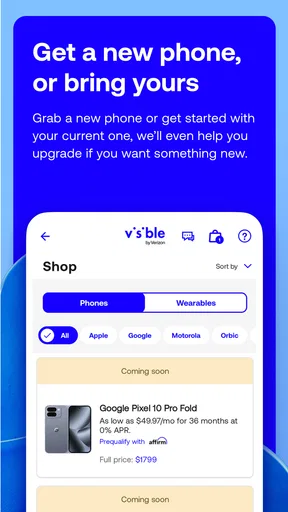
Yes, Visible Mobile allows you to bring your own device if it is compatible with their network. Most unlocked, Verizon-compatible phones will work. You can check your phone's compatibility on Visible's website before making the switch, ensuring a smooth transition.
How does customer support work with Visible Mobile?
Visible Mobile primarily offers customer support through their app, website, and social media channels. There is no traditional call center, which may be a drawback for those who prefer speaking to a representative by phone. However, their support team is available 24/7 to assist with any issues or questions.
What are the payment options available for Visible Mobile?
Visible Mobile offers flexible payment options, accepting major credit cards and some digital payment methods like PayPal. Payments are made monthly, and users can set up auto-pay to ensure they never miss a payment. This flexibility makes managing your mobile service straightforward and hassle-free.


